

Building Lucifer: an open-source AI company you can watch · ⭐ GitHub
🚀 Start here: 1. Meet Lucifer · 2. Why I built it · 3. Architecture
📖 Use it: 4. Getting started · 5. Connect an LLM · 6. Office tour
🛠 Build the engine: 7. Org chart in YAML · 8. Real delegation · 9. Sandboxed tools · 10. Simulation brain
🎨 Build the office: 11. 3D office with R3F · 12. WebSocket + zustand · 13. Visualizing workflow
🧭 What's next: 14. Roadmap · 15. Contributing
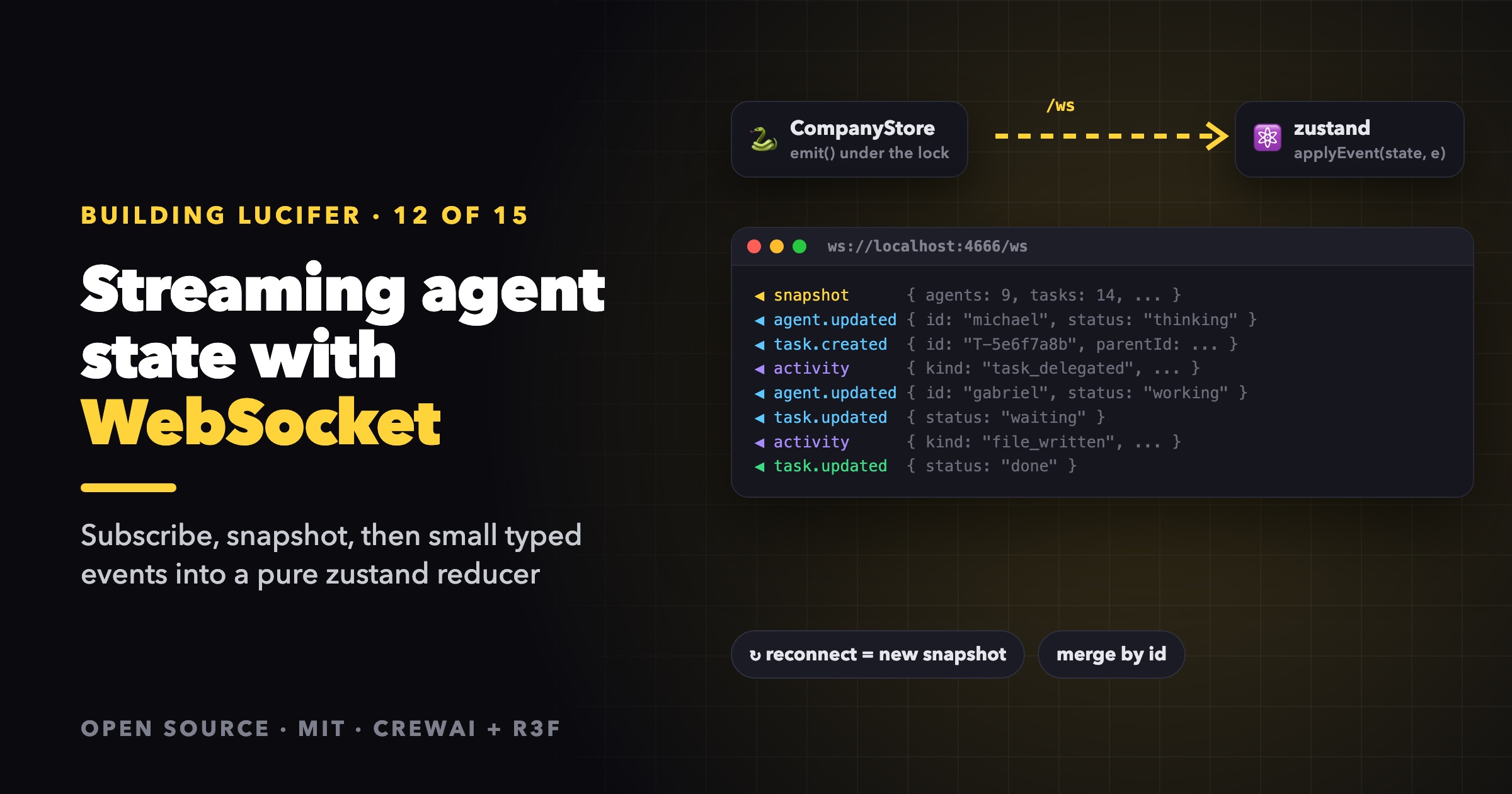
The Lucifer engine runs agents on several threads at once. Statuses flip many times a second, tasks are created and finished, and every thought and file write becomes an activity. The office has to show all of it, live, in a 3D scene, without missing an update or re-rendering the world on every event. This post covers the pipeline from Python to pixels.
agent thread ──▶ CompanyStore (lock) ──▶ listener ──▶ asyncio queue ──▶ /ws
                                                                          │
browser ◀── useFrame / components ◀── zustand store ◀── applyEvent() ◀────┘
On the engine: one store, every change is an event
CompanyStore is the only place state changes, and every change emits an event:
class CompanyStore:
    """Thread-safe: each agent's brain runs in its own thread.

    Listeners are called synchronously, under the lock, on the thread that made the change, so
    events arrive in the order of the changes. Listeners must be fast and must not call back into
    the store; the server's listener only hands events over to its event loop.
    """
Two properties matter:
- Ordering. Calling listeners under the lock means events go out in exactly the order the state changed. The office never sees a task finish before it started.
- Listeners must be cheap. The lock is held while they run, so a listener can't do I/O. It hands off and returns.
Saving is debounced. A change starts a 0.5-second timer that writes state.json, so a burst of a hundred status flips becomes one write. On shutdown, flush() cancels the timer and saves right away.
The WebSocket: subscribe first, then snapshot
@app.websocket("/ws")
async def ws(socket: WebSocket) -> None:
    """Send a snapshot on connect, then push every change event.

    Subscribes before taking the snapshot so no change is missed; a few events may
    repeat what the snapshot already contains (clients merge by id).
    """
    await socket.accept()
    loop = asyncio.get_running_loop()
    queue: asyncio.Queue[dict] = asyncio.Queue()

    def forward(event: Model) -> None:
        loop.call_soon_threadsafe(queue.put_nowait, event.to_json())

    unsubscribe = store.subscribe(forward)
    try:
        await socket.send_json(SnapshotEvent(data=snapshot()).to_json())
        while True:
            await socket.send_json(await queue.get())
    except WebSocketDisconnect:
        pass
    finally:
        unsubscribe()
The order of the first two lines is the whole trick.
- Snapshot first, then subscribe: any change that happens between the two is lost forever, and the client is silently out of date.
- Subscribe first, then snapshot: a change in between is both in the snapshot and in the queue. The client receives it twice, which is harmless as long as applying an event is idempotent.
So Lucifer subscribes first and makes the client merge by id.
The bridge between threads is loop.call_soon_threadsafe(queue.put_nowait, ...). The agent's thread never touches the asyncio queue directly. It schedules the put on the event loop, which keeps the store's lock short and the WebSocket send entirely async.
Each connection gets its own queue and subscription. That's what lets several tabs, or several people, watch the same company.
A typed protocol on both sides
The event types are Pydantic models in protocol.py, joined in a discriminated union:
ServerEvent = Annotated[
    Union[SnapshotEvent, AgentUpdatedEvent, TaskCreatedEvent, TaskUpdatedEvent, ActivityEvent, EngineUpdatedEvent],
    Field(discriminator="type"),
]
The office mirrors them as TypeScript types, and a switch on event.type narrows event.data automatically. Fields are camelCase on the wire, generated by Pydantic's to_camel alias generator, so Python stays snake_case and TypeScript stays camelCase. To keep the two in sync:
uv run lucifer-engine schema > protocol.schema.json
Events carry whole entities, not patches. A task.updated event contains the full task. That makes every event self-contained: the client replaces by id and never needs to know what changed.
The client: a reconnecting socket
export function connectEngine(): () => void {
  let socket: WebSocket | null = null;
  let retry = 0;
  let timer: ReturnType<typeof setTimeout> | null = null;
  let stopped = false;
  const { apply, setConnection } = useOffice.getState();

  const open = () => {
    setConnection("connecting");
    socket = new WebSocket(wsUrl());
    socket.onopen = () => { retry = 0; setConnection("open"); };
    socket.onmessage = (m) => apply(JSON.parse(m.data as string) as ServerEvent);
    socket.onclose = () => {
      setConnection("closed");
      if (stopped) return;
      const delay = Math.min(10_000, 500 * 2 ** retry++);
      timer = setTimeout(open, delay);
    };
  };
  open();

  return () => { stopped = true; if (timer) clearTimeout(timer); socket?.close(); };
}
Exponential backoff from 0.5 s up to 10 s. Reconnecting is cheap, because the first message on every connection is a full snapshot that replaces the client state. There's no "resume from offset" logic to get wrong. Restart the engine and the office catches up by itself.
A pure reducer
All of the state logic is one pure function:
export function applyEvent(state: OfficeData, event: ServerEvent, now = Date.now()): OfficeData {
  switch (event.type) {
    case "snapshot": {
      const { company, engine, agents, tasks, activities } = event.data;
      return {
        company, engine,
        agents: Object.fromEntries(agents.map((a) => [a.id, a])),
        agentOrder: agents.map((a) => a.id),
        tasks: Object.fromEntries(tasks.map((t) => [t.id, t])),
        activities: activities.slice(-MAX_ACTIVITIES),
        bubbles: {},
      };
    }
    case "agent.updated": {
      const agent = event.data;
      const agentOrder = state.agents[agent.id] ? state.agentOrder : [...state.agentOrder, agent.id];
      return { ...state, agents: { ...state.agents, [agent.id]: agent }, agentOrder };
    }
    case "task.created":
    case "task.updated":
      return { ...state, tasks: { ...state.tasks, [event.data.id]: event.data } };
    case "engine.updated":
      return { ...state, engine: event.data };
    case "activity": {
      const activity = event.data;
      // Events right after the snapshot may repeat what it already contains.
      if (state.activities.some((a) => a.id === activity.id)) return state;
      const activities = [...state.activities, activity].slice(-MAX_ACTIVITIES);
      const bubbles = activity.agentId && BUBBLE_KINDS.has(activity.kind)
        ? { ...state.bubbles, [activity.agentId]: { activity, at: now } }
        : state.bubbles;
      return { ...state, activities, bubbles };
    }
  }
}
- Entities are keyed records, so replacing by id is idempotent by construction. A duplicate
task.updatedafter the snapshot is a no-op in effect. - Activities are an append-only log, so they need an explicit duplicate check by id. The log is capped at 300 entries.
- Speech bubbles are derived on arrival, with a timestamp. A component hides each bubble after 7 seconds.
nowis a parameter, so tests control time.
Because it's pure, the reducer is tested without a socket, a store or a browser:
it("ignores duplicate activity ids (events repeated after the snapshot)", () => {
  const a = activity("dup", "update", "lucifer");
  let s = applyEvent(emptyOffice, { type: "snapshot", data: { ...snapshot, activities: [a] } });
  const before = s;
  s = applyEvent(s, { type: "activity", data: a });
  expect(s).toBe(before);
});
The zustand store just wraps it: apply: (event) => set((s) => applyEvent(s, event)).
Rendering without re-rendering everything
Immutable updates give every slice a new identity only when it changes. The office leans on that in four ways.
1. Narrow selectors. Components subscribe to exactly what they show:
const agent = useOffice((s) => s.agents[task.assigneeId]);
When Gabriel's status flips, only components that read Gabriel re-render.
2. Memoize derived views on slice identity. Several components need the same derived data, such as the task tree index or the latest activity per task. Instead of each one computing it, a tiny helper caches the last input and output:
/** Memoize on the identity of the store slice, so every card shares one computation per update. */
function lastValue<I, O>(fn: (input: I) => O): (input: I) => O {
  let lastIn: I | undefined;
  let lastOut: O | undefined;
  return (input) => {
    if (input !== lastIn) { lastIn = input; lastOut = fn(input); }
    return lastOut!;
  };
}
With twenty task cards on screen, childrenIndex(tasks) still runs once per update, not twenty times.
3. One shared clock. Running timers ("1:05") tick every second. Instead of one setInterval per card, there is one module-level clock exposed with useSyncExternalStore, which only runs while something subscribes:
export function useNow(active = true): number {
  return useSyncExternalStore(active ? subscribe : noop, () => (active ? now : 0));
}
Finished tasks pass active = false and stop re-rendering entirely.
4. Per-frame work skips React. The 3D scene reads the store inside useFrame with useOffice.getState(), without subscribing, and mutates Three.js objects directly. The follow camera, for example, checks the store every 400 ms in the frame loop. React renders only when the data changes, and animation runs on its own.
Takeaways
- Emit events from the one place state changes, under the same lock as the change, to keep their order.
- Subscribe before you snapshot, and make applying events idempotent.
- Send whole entities, keyed by id. Patches are an optimization you probably don't need.
- Reconnect by replacing the state with a fresh snapshot.
- Keep the reducer pure, and test it like a function.
- Separate "data changed" from "frame ticked". React handles the first, and
useFramethe second.
The engine side is in server.py and store.py. The client side is in state/engine.ts and state/office.ts.
Next: visualizing workflow with work links, comets and a follow camera.
Lucifer is open source under the MIT license. Clone it, run it for free with the simulation brain, and ⭐ star it if you'd like to follow along: github.com/siri2moon/lucifer.
Next in the series: Visualizing Workflow: Work Links, Comets and a Camera That Follows Hand-offs.