

AI Video Studio with Claude Code + Remotion
🛠 Build it: 1. Setup & your first skill · 2. The script-writing skill · 3. The editing skill · 4. The local AI story skill · 5. The comedy script skill
🎬 Use it: Talking-head video · AI story video · Deadpan comedy video
🔬 Under the hood: Architecture · Subtitles · Jump cuts · Music & SFX · Local AI pipeline
There's a whole genre of short video built on a simple, effective format: a bold two-line title frozen at the top of the screen, a hand-drawn-style illustration in the middle that changes every few seconds, a calm narrator telling a small fable — an old man planting trees he'll never sit under, a ferryman who never asks where his passengers are going — and subtitles underneath. No face, no camera, no studio.
It's also a format that maps almost perfectly onto generative AI: a script, a voice and a set of illustrations. The usual way to build it is to chain cloud APIs — a language model, a TTS service, an image generator — and pay per call. This post builds it entirely on a laptop: Vietnamese narration from an open-source TTS model, illustrations from an open-weight image model running on the Mac's GPU, and Remotion for the edit. No API keys, no per-video cost, nothing leaves your machine.
Every number in this post was measured on an M3 Pro MacBook with 18 GB of memory. The illustration step is slow — about three and a half minutes per image — and much of the design exists to respect that.
The pipeline
flowchart LR
    S[A fable or a theme] --> C[Claude Code: /ai-story]
    C --> J[story.json + story.md]
    J --> A{You approve?}
    A -->|edit| C
    A -->|yes| T[tts.mjs: VieNeu-TTS]
    A -->|yes| I[images.mjs: mflux + Z-Image Turbo]
    T --> TJ[audio/voice.wav + timing.json]
    I --> IM[images/s01.png ...]
    TJ --> P[build-props.mjs]
    IM --> P
    P --> R[Remotion StoryVideo]
    R --> O[out/video.mp4]
| Stage | Output | Time for a ~1-minute video |
|---|---|---|
| Write the script (Claude) | story.json, story.md | seconds |
| You approve | ||
| Narration | audio/l001.wav…, audio/voice.wav, timing.json | well under a minute |
| Illustrations | images/s01.png… | ~3.5 min per scene, so 35+ min for 10 scenes |
| Props + render | out/<dir>.mp4 | a few minutes |
The tools
| Job | Tool | License / notes |
|---|---|---|
| Narration | VieNeu-TTS | Apache 2.0. Vietnamese TTS that runs on CPU, 14 built-in voices across Northern, Central and Southern accents, and voice cloning from a short sample |
| Illustrations | mflux running Z-Image Turbo | MIT. A native Apple Silicon implementation of modern diffusion models on Apple's MLX framework |
| Editing | Remotion, composition StoryVideo |
Step 0: Setup
A setup script creates an isolated Python environment for the TTS (outside git, under .ai-story/venv/) and installs mflux as a uv tool:
brew install ffmpeg uv
node .claude/skills/ai-story/scripts/setup.mjs
node .claude/skills/ai-story/scripts/setup.mjs --check   # verify at any time
If mflux-generate-z-image-turbo isn't found afterwards, uv installed it into ~/.local/bin, which isn't on your PATH yet:
export PATH="$HOME/.local/bin:$PATH" # add to ~/.zshrc
Models download on first real use:
| Model | Size | When |
|---|---|---|
| VieNeu-TTS v3 Turbo | ~300 MB | First narration run |
| PyTorch (voice cloning only) | ~1 GB | During setup (--no-clone skips it) |
| Z-Image Turbo, 4-bit | 5.5 GB | First illustration run |
One choice here saves you 27 GB. mflux's built-in model name z-image-turbo points at the original Hugging Face weights, which are stored at full precision: you download 33 GB and quantize locally. The mflux author publishes a pre-quantized 4-bit build that's 5.5 GB and, for flat illustration styles, looks the same:
| Build | Size | Use when |
|---|---|---|
filipstrand/Z-Image-Turbo-mflux-4bit | 5.5 GB | Default; plenty for flat illustrations |
carsenk/z-image-turbo-mflux-8bit | 11 GB | You want crisper detail |
z-image-turbo (built-in name) | 33 GB | Avoid |
Loading pre-quantized weights needs mflux 0.13 or newer. Hugging Face also throttles anonymous downloads heavily; a free read token in HF_TOKEN speeds things up considerably, and an interrupted download resumes where it stopped.
Step 1: A script built for a voice and an image model
The /ai-story skill turns a story into story.json. Here is an excerpt from a real one — an 11-scene fable about an old man planting trees — with two of its four characters and its first scene:
{
  "id": "2026-08-18-21-46-nguoi-trong-cay",
  "title": { "line1": "NGƯỜI TRỒNG CÂY", "line2": "KHÔNG NGỒI DƯỚI BÓNG" },
  "voice": "Thanh Bình",
  "style": "doodle",
  "seed": 20260818,
  "cast": [
    {
      "id": "lao",
      "look": "An old white stick-figure man with a smooth bald oval head, a short white beard, two tiny black dot eyes and a calm patient expression, wearing a simple brown vest over a white shirt and loose grey trousers rolled up to the knee, thin black stick arms and legs."
    },
    {
      "id": "giagia",
      "look": "The same man now old: a white stick-figure man with a bald oval head, a short grey beard, slightly stooped shoulders, wearing a faded blue shirt and dark trousers, leaning on a simple wooden walking cane."
    }
  ],
  "scenes": [
    {
      "id": "s01",
      "lines": ["Có một ông lão đào hố bên vệ đường đất, dưới cái nắng tháng sáu."],
      "image": "He is digging a small hole with a worn shovel beside a dusty dirt road under a harsh summer sun, dry yellow fields stretching to the horizon, heat haze in the distance.",
      "cast": ["lao"]
    }
  ]
}
The title reads "THE TREE PLANTER / DOESN'T SIT IN THE SHADE"; the first line, "An old man was digging a hole beside a dirt road, under the June sun." And this is what the image model drew for that scene, from the image text plus the lao description:

The format looks simple, but each field encodes a lesson about what the downstream models can and can't do.
Narration in Vietnamese, image descriptions in English — no exceptions. The image model doesn't understand Vietnamese, and a Vietnamese prompt quietly produces an unrelated picture. The validator rejects any Vietnamese diacritics in image and cast[].look.
Every recurring character is declared once in cast. The image model has no memory; each scene is generated from nothing but the text it's given. If the old man is described differently, or not at all, in scene 7, he looks like a different person in scene 7. So appearance lives in one place and is injected into every scene the character appears in. A good look covers five things — build, hair, eyes or glasses, top, bottom — plus one signature prop (a stick, a basket, a scarf). The validator warns when a look is under 40 characters. The same person at two ages gets two entries — in this story, trai is the young man who mocks the planter, and giagia (above) is that same man decades later — never one description trying to cover both.
One lines entry is one subtitle line and one audio file. Each entry should be a complete sentence under about 85 characters (110 is a hard error, since it won't fit in two subtitle lines). Why it's one file per line is the key idea of the narration step below.
The title is two lines, uppercase, under 20 characters each. It stays on screen for the entire video, so it has to survive being looked at for three minutes. Good titles are paradoxes ("THE TREE PLANTER / NEVER SITS IN THE SHADE"), "who fears whom" pairs, or "what it costs" pairs — and they never give away the ending.
Writing the story itself
The skill's storytelling reference gives Claude a five-beat structure with a time budget, and one rule that does most of the work:
| Beat | Share | Job |
|---|---|---|
| Open | 10% | Put the character in a specific place |
| Build | 30% | Show what they do, steadily |
| Clash | 25% | Someone mocks them, or something goes wrong |
| Turn | 25% | Time passes or the truth comes out; the viewer understands it backwards |
| Settle | 10% | An action, not a lesson |
The difference between a good video in this genre and a preachy one is the last beat. "He stood up. Then he went to find a shovel." lets the viewer draw the lesson themselves. "So let us all be grateful to those who came before" tells them, and they scroll away. The reference also bans fabricated attributions: a fable is told as a fable, never as something the Buddha or a famous CEO supposedly said.
A scene is one image, one to three lines, and 2.5–6 seconds. Cut to a new scene when the picture must change — a new place, a jump in time, a different character acting, or a switch from the outside world to someone's thoughts — not just because a sentence got long. For abstract ideas, the genre has a visual vocabulary that's both easy to generate and instantly readable: a thought bubble with a picture inside for thinking, a pale grey bubble for memory, a fork in the road for a choice, the same landscape across seasons for passing time, a split frame for comparison.
Step 2: Validate, then stop for approval
S=.claude/skills/ai-story/scripts
node $S/validate-story.mjs content/<dir>/story.json && node $S/build-docs.mjs content/<dir>/story.json
The validator estimates the narration length from character count — VieNeu-TTS reads about 18.5 characters per second, within 5% — and from that, the length of every scene and the total number of minutes the illustrations will take. It warns about scenes that hold one picture for more than 8 seconds and lines that will run over 7.
Then the skill stops. It prints the title, the scene table from story.md, the estimated duration and the image-generation time, and waits. A 30-scene story is close to two hours of image generation; finding out after those two hours that scene 4 should have been cut is the most expensive mistake in the pipeline, and the cheapest to prevent.
Step 3: Narration with exact timing, no Whisper required
The selfie pipeline needs speech recognition to find out when each word is said. This pipeline doesn't, because it creates the audio itself — and it creates it one line at a time.
Synthesizing the whole story as one file and then working out where each line lands would mean running recognition on our own output and getting timings that are a few hundred milliseconds off. Synthesizing each line separately makes its duration a measured fact: the number of samples in the file, divided by the sample rate.
A Python worker over stdin/stdout
The TTS model is a Python library, the pipeline is Node. The bridge is a small worker: Node writes a JSON job to its stdin, the worker writes one WAV per line plus a JSON result to stdout, and progress logs go to stderr so they stream to the terminal without corrupting the result:
job = json.load(sys.stdin)
tts = Vieneu()  # on Apple Silicon the ONNX path beats MPS

if job.get("refAudio"):
    voice = tts.add_voice("user", job["refAudio"], denoise=True)  # clone once, reuse
else:
    voice = job["voice"]

results = []
for item in job["lines"]:
    wav = tts.infer(item["text"], voice=voice)
    path = out_dir / f"{item['id']}.wav"
    tts.save(wav, path)
    results.append({"id": item["id"], "file": path.name, "sec": round(len(wav) / tts.sample_rate, 4)})

json.dump({"sampleRate": tts.sample_rate, "lines": results}, sys.stdout, ensure_ascii=False)
sys.stdout.flush(); sys.stderr.flush()
os._exit(0)
That last line is a scar from production. With voice cloning enabled, PyTorch and ONNX Runtime are both loaded in the same process, and tearing them down occasionally crashes with a mutex error — after every file has been written and the result printed. Node saw a non-zero exit code and declared the whole stage failed. os._exit(0) skips all destructors once everything is safely on disk. As a second line of defense, the Node side trusts the parsed result over the exit code: if it got a complete, well-formed list of lines, it continues with a warning.
Measured speed: loading the model takes about 6 seconds per run, and synthesis runs at about 6.4× real time — three minutes of narration in under half a minute.
Trimming silence with a threshold that adapts
VieNeu-TTS pads each file with silence at the start and end, inconsistently — up to 500 ms. Line the files up as they are and every subtitle appears half a second before its voice.
The obvious fix, FFmpeg's silenceremove with a fixed dB threshold, failed. One line began with 470 ms of audible breath sitting between −54 dB and −40 dB; every fixed threshold either kept the breath or shaved the soft consonant off the start of some other line. The fix is a threshold relative to each file's own peak:
const PAD = 0.04; // keep a little, so initial consonants survive
const REL = 0.06; // 6% of peak amplitude ≈ the line between breath and speech

const speechBounds = (file) => {
  // decode to 8 kHz mono 16-bit, compute RMS in 10 ms windows
  const env = rmsWindows(file, 80);
  const thr = Math.max(...env, 1) * REL;
  let a = env.findIndex((e) => e >= thr);
  let b = env.length - 1;
  while (b > a && env[b] < thr) b--;
  if (a < 0) return null; // all silent — leave the file alone, don't cut blind
  return { start: Math.max(0, (a * 80) / 8000 - PAD), end: ((b + 1) * 80) / 8000 + PAD };
};
A loud line and a quiet line each get a threshold scaled to themselves, with no hand-tuning.
Placing every line at an exact millisecond
With clean files and known durations, the timeline is arithmetic: a 0.35 s lead-in, then each line, with a 0.16 s gap between lines in the same scene and 0.38 s between scenes so the listener can register the change, and 0.9 s of tail at the end. Rather than concatenating files and hoping the gaps add up, each line is placed at its computed start with FFmpeg's adelay and everything is mixed in one pass:
const delays = items
  .map((it, i) => `[${i}:a]adelay=${Math.round(it.startSec * 1000)}:all=1[a${i}]`)
  .join(';');
const mix = items.map((_, i) => `[a${i}]`).join('');
const filter =
  `${delays};${mix}amix=inputs=${items.length}:normalize=0:dropout_transition=0[m];` +
  `[m]apad=whole_dur=${totalSec},loudnorm=I=-16:TP=-1.5:LRA=11[out]`;
normalize=0 stops amix from dividing the volume by the number of inputs, and a final loudnorm brings the narration to −16 LUFS. The computed start and end of every line are written to timing.json, which becomes the timing contract for the entire video: subtitles, scene changes and total length are all derived from it.
Cloning a voice
The 14 built-in voices are grouped by style. For this genre, use the four storytelling voices; the news voices read too crisply and turn a fable into a bulletin. To use your own voice, record 5–10 seconds of clean speech in a quiet room with no music, and pass it in:
node .claude/skills/ai-story/scripts/tts.mjs <slug> --ref=~/my-voice.wav
Cloning needs PyTorch even though built-in voices don't: the reference-voice encoder is a PyTorch model, and disabling denoising doesn't avoid it.
There's also a helper that extracts a usable sample from an existing video. It scans the file in windows and scores each by energy in the speech band (300–3,400 Hz) minus energy below 200 Hz. Background music lives mostly in the low band, so that difference approximates a voice-to-music ratio, and the best-scoring window wins. It then high-passes at 95 Hz, applies light spectral denoising and normalizes. On the reference video, the filtered sample matched the original speaker's pitch at exactly 106.7 Hz, while unfiltered samples were off by 1.4–13.6 Hz. Even so, a source with music underneath always clones worse than a clean recording — the model learns the music into the voice.
Step 4: Illustrations that stay consistent
Building the prompt
Each scene's prompt is assembled from four parts, in an order that matters:
const count = cast.length
  ? `Exactly ${NUM[cast.length]} character${cast.length > 1 ? 's' : ''} in the frame, no one else.`
  : '';
const prompt = [style.prompt, `Scene: ${sc.image}`, count, who].filter(Boolean).join(' ');
- The style preset — a long, specific description of the art style, from
styles.json. - The scene — what's happening, in English.
- A head count, written as a word ("Exactly two characters"). Without it, the model often added a blank white figure to the frame; it read the style description's rules about how characters are drawn as a description of another character, and drew one. The model also follows "two" more reliably than "2".
- Each present character's
look, last, so the appearance attaches to the characters the scene just set up rather than floating off as a separate description.
Here is the head-count problem in an early test render of a late scene — a child asking the old man a question. The scene has two characters; the model drew three, adding a blank white figure on the left:
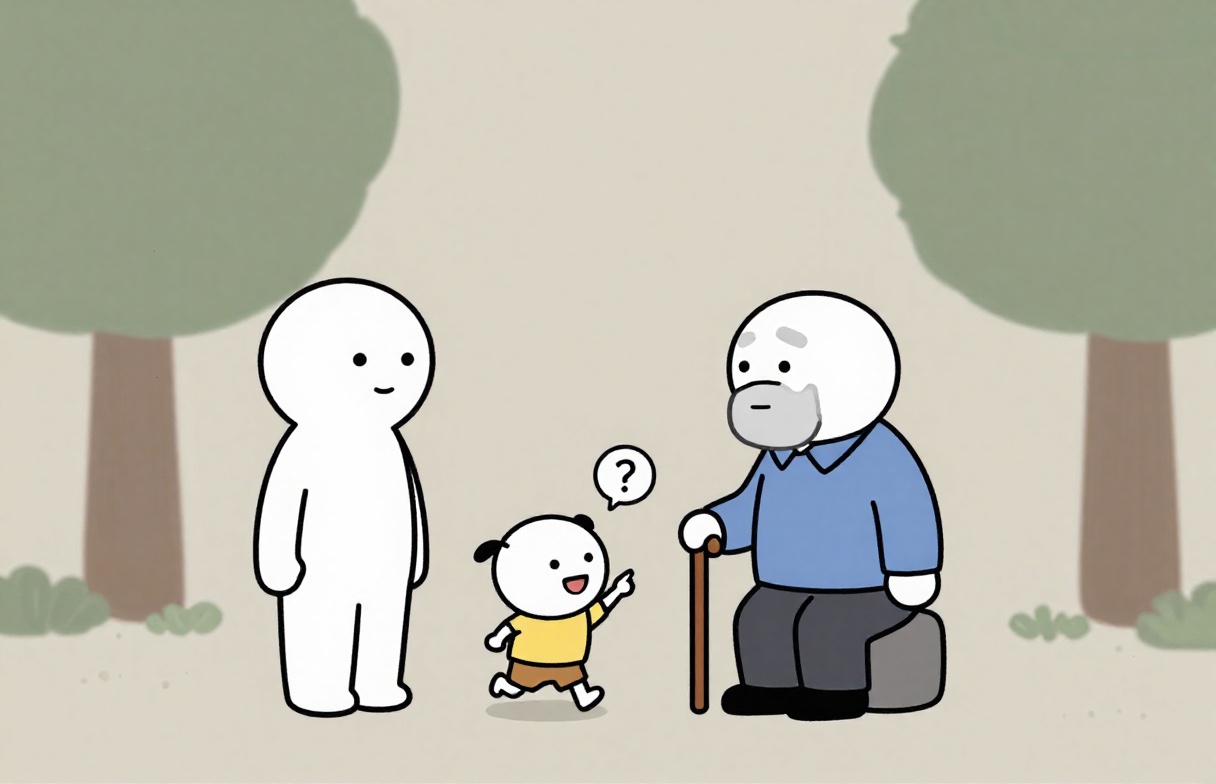
And the same scene from a later revision of the prompt, with exactly the two characters it describes:
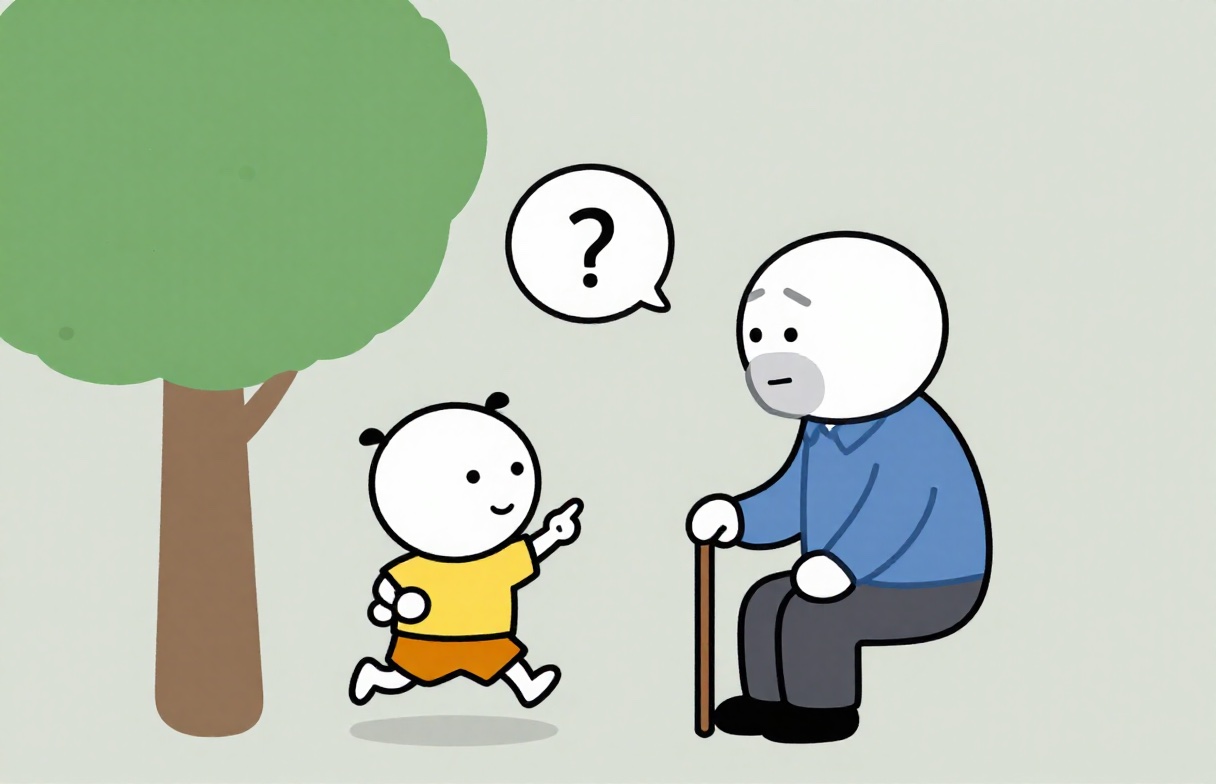
Every scene also uses the same seed by default (seedMode: "fixed"), which keeps characters noticeably more consistent across scenes. "vary" gives more varied compositions at the cost of characters drifting.
Style presets as data
"doodle": {
  "prompt": "flat 2D vector cartoon illustration, simple stick-figure explainer animation style. Drawing rules: each head is a large smooth white oval with two tiny black dot eyes, thin arched black eyebrows, a small simple curved mouth and no nose; arms and legs are thin black lines, never filled shapes; hands are small white mittens; ... Characters, props and background are all drawn with the same clean bold black outlines and flat colours ...",
  "negative": "photograph, photorealistic, 3d render, ... text, letters, words, caption, watermark, ... extra person, blank featureless white figure, faceless body, thick fleshy limbs, ...",
  "steps": 8
}
Three presets ship: doodle (stick figures; by far the easiest to keep consistent), tranh (painted storybook illustrations; harder) and muc (ink wash on rice paper; sparse, so also consistent). Adding a style means editing the JSON, not the code. The negative prompt bans text outright: the model misspells Vietnamese, and any caption belongs in the subtitle layer.
The generation call
spawnSync('mflux-generate-z-image-turbo', [
  '--model', 'filipstrand/Z-Image-Turbo-mflux-4bit',
  '--prompt', prompt,
  '--negative-prompt', style.negative,
  '--width', '1216', '--height', '784',
  '--steps', String(style.steps),
  '--seed', String(seed),
  '--output', out,
]);
The size is not arbitrary. The image panel in the video is 1080×696, an aspect ratio of 1.552. Generating at 1216×784 — the same ratio, slightly larger — leaves enough extra pixels for the slow zoom in the edit without upscaling.
There's no --guidance flag, on purpose. Z-Image Turbo is a distilled model that runs without classifier-free guidance; mflux accepts the flag and ignores it. That was verified rather than assumed: the same seed at guidance 1.8 and 3.0 produced pixel-identical images (PSNR = ∞), differing only in the PNG's metadata. Leaving the flag in would be a knob connected to nothing.
Speed, measured
| Setting | Per image | Trade-off |
|---|---|---|
| 1216×784, 8 steps | 186–209 s | Default — clean lines, enough detail |
| 1216×784, 4 steps | 106 s | Twice as fast, but hands blur into blobs, foliage flattens, held objects break |
| 960×620, 8 steps | 127 s | Still clean, but must be upscaled 1.25× for the zoom, and faces drift |
Resumable by design
Because each image takes minutes, the stage skips any scene whose image already exists. An interrupted run loses nothing; re-running continues where it stopped. A single bad image is fixed by editing that scene's image text and regenerating only it:
node $S/images.mjs <slug> --only=s07   # redraw one scene
node $S/images.mjs <slug> --dry        # print every full prompt without drawing
Step 5: The edit
Every layout number in the StoryVideo composition was measured from a reference video in this genre (576×1024) and scaled by 1.875 to 1080×1920 — nothing is eyeballed.
| Zone | Height | Content |
|---|---|---|
| Background | full frame | Flat blue-grey #495B66 |
| Title | 14.7–29.2% | Two uppercase lines, static for the whole video |
| Image panel | 31.8–68.0% | Full-width, 696 px tall |
| Subtitles | 69.7–76.9% | Up to two lines |
| Empty | 77–100% | Reserved for the platform's buttons |
The title: one size for both lines
The title uses Anton, a narrow, very heavy grotesque — chosen because it matches the genre's look and is one of very few fonts of its kind with a Vietnamese subset. Similar-looking fonts without Vietnamese glyphs render accented capitals as empty boxes. Line one is lime yellow with a black outline; line two is red with a white outline.
The detail that's easiest to get wrong: both lines use the same font size, 120 px. Measuring the bare letter N in the reference gave 99 px on line one and 96 px on line two — the same size. Line one only looks bigger because it has more letters. Fitting each line to the full width independently produces two different sizes, which immediately looks amateurish. Instead, each line is measured with fitText from @remotion/layout-utils against the maximum title width, and both lines use the smallest of those two sizes and 120 px — so when one line is too long, both shrink together:
const fontSize = Math.min(STORY.title.maxFontSize, measure(title.line1), measure(title.line2));
Line height is 1.4, not the 1.3 measured from the reference. At 1.3, Anton's stacked diacritics on the second line — Ô, Ồ, Ứ, Ữ — collided with the bottom of the first. Vietnamese capitals with stacked marks reach far higher than Latin capitals, so Vietnamese titles need more leading than their English equivalents. And as in the selfie pipeline, paint-order: stroke fill is mandatory, or the outline swallows the diacritics.
Crossfades without a flash of background
Images change with a 12-frame (0.4 s) cross-dissolve. The classic mistake is to fade the outgoing image out while fading the incoming one in: halfway through, both are at 50% and the grey background shows through. The fix is to fade only the incoming image, on top of a fully opaque outgoing one:
const OneShot: React.FC<{ shot: Shot; index: number }> = ({ shot, index }) => {
  const frame = useCurrentFrame();
  const end = shot.fromFrame + shot.durationInFrames;
  // Stay mounted for one crossfade past the end, so the next image has something to cover.
  if (frame < shot.fromFrame || frame > end + STORY.panel.crossfade) return null;

  const opacity = index === 0
    ? 1 // the first image is there from frame one
    : interpolate(frame, [shot.fromFrame, shot.fromFrame + STORY.panel.crossfade], [0, 1], CLAMP);
  const zoom = interpolate(frame, [shot.fromFrame, end], [shot.zoomFrom, shot.zoomTo], CLAMP);

  return (
    <Img
      src={staticFile(shot.src)}
      style={{
        position: 'absolute', inset: 0, width: '100%', height: '100%', objectFit: 'cover',
        transform: `scale(${zoom})`,
        transformOrigin: `${shot.originX * 100}% ${shot.originY * 100}%`,
        opacity,
      }}
    />
  );
};
As a check, FFmpeg scene detection at a threshold of 0.25 finds zero cuts in the reference video — the transitions are that smooth — and zero in this pipeline's output.
Ken Burns that doesn't look automated
Each image slowly zooms: even scenes zoom in from 1.02 to 1.11, odd scenes zoom out from 1.11 to 1.02, and the zoom origin rotates among four points. The same motion repeated for three minutes is something viewers consciously notice as "made by a machine"; alternating direction and center hides it. The zoom never reaches exactly 1.0, since a one-pixel rounding error at 1.0 exposes the background at the panel's edge.
Subtitles by line, not by word
Unlike the selfie format's bouncing word-by-word captions, subtitles here show one full line at a time in Nunito italic, white, with text-wrap: balance and a soft shadow. There's no highlighting or animation: in a storytelling video, dancing text would compete with the illustration for attention. Each subtitle line is exactly one TTS line, so it switches precisely when the voice does. It lingers 0.28 s after the voice ends so readers can finish, but never past the start of the next line.
Background music plays continuously at 10% volume: the reference video never drops below −24 dB in its 206 seconds, so the music never stops under the narration — audible, but never competing with it.
Running it
/ai-story "An old man plants trees along a dusty road, knowing he'll never live to sit in their shade…"
After you approve the script:
S=.claude/skills/ai-story/scripts
node $S/tts.mjs         <slug>   # narration + timing.json
node $S/images.mjs      <slug>   # the long one — fine to run in the background
node $S/build-props.mjs <slug>
node $S/render.mjs      <slug>   # → out/<dir>.mp4
Before committing two hours to illustrations, you can check everything else in seconds:
node $S/make-test-images.mjs <slug>          # placeholder images, one flat color per scene
node $S/build-props.mjs      <slug>
node $S/render.mjs           <slug> --frame=240   # one frame as a PNG
Takeaways from the series
Across five posts, the same few ideas kept doing the heavy lifting:
- Let Claude write structured creative data, and let code measure everything else. Scripts, stories and comedy acts are JSON; durations, timestamps and cut points come from files.
- Generate what you can predict, measure what you can't. This pipeline knows exactly when each line is spoken because it made the audio one line at a time; the selfie pipeline had to align its way to the same knowledge.
- Model limitations become schema rules. The image model has no memory, so characters are declared once and injected everywhere. It doesn't read Vietnamese, so the validator enforces English prompts.
- Measure, don't assume. A guidance flag that does nothing, a font size that's shared, a line height that needs to grow for diacritics, a 33 GB download that could be 5.5 GB — each was found by checking.
- Put the human where judgment is cheap and mistakes are expensive. Approving a script takes a minute. Regenerating thirty illustrations takes two hours.
Everything here runs on one laptop, costs nothing per video, and produces media you own outright. That's the real promise of combining an agentic coding tool with a code-first video framework: not a magic "make video" button, but a production line you understand completely and can change in an afternoon.