


🌙 Space2Moon: send your junk to the moon · ⬇ Download for macOS · free, open source (MIT), no account, no telemetry
"Your disk is almost full."
I saw that warning so often I stopped reading it. I'd empty the Trash, delete a few movies, get 10 GB back, and a week later the warning was back. The problem was never how to delete files. It was that I had no idea what kept filling the disk.
So I built Space2Moon: a free, open-source Mac app that looks in every place disk space hides, tells you in plain words why your disk is full, and gives the space back. And because cleaning a disk is a chore, I made it feel like casting spells.
Space2Moon in 28 seconds.
Why your Mac's disk keeps filling up
If you're wondering where the space went, these are the usual suspects. Most of them are invisible in Finder:
- Developer caches. npm, pnpm, Yarn, Bun, Gradle, Cargo, CocoaPods and pip all keep a copy of every package version you've ever installed. On my Mac that was 40 GB.
- Xcode. DerivedData, old device support files and simulators easily reach tens of gigabytes, and nothing ever cleans them up.
- App caches. Browsers, Spotify, Slack, Homebrew and every Electron app keep their own cache. Mine added up to 28 GB.
- iPhone and iPad backups. Every local Finder backup is a full copy of a device, including phones you sold years ago.
- Mail and Messages. Mail keeps a local copy of every email and attachment. Every photo and video anyone ever sent you in iMessage stays on the Mac.
- Time Machine local snapshots. macOS keeps hourly snapshots on the internal disk when your backup drive isn't plugged in.
- Docker and virtual machines. One
Docker.rawfile can quietly grow to 60 GB. - System Data. The grey bar in Storage settings that nobody can explain: swap, the sleep image, app data and more.
The Storage panel in System Settings shows some of this, but it doesn't tell you what grew, and it can't open most of these folders.
What Space2Moon does

The main window. The left side answers "why is my disk full", the grid on the right is every place space hides.
1. It finds every hiding place
Open the app and it scans 13 places at once: the Trash, app caches, logs and crash reports, Xcode debris, developer caches, iPhone and iPad backups, Mail, Messages attachments, Downloads, files over 500 MB, Time Machine local snapshots, Docker and VM disks, and System Data.
The rune circle shows the real numbers: what is truly used, what macOS calls purgeable (space it says it will free on its own), and what is free right now.
2. It explains why, not just how much
The "Why your disk is full" panel ranks what is taking the space, in plain words. Space2Moon also keeps a small history on your Mac, so the second time you open it, it can tell you what grew since a scan at least 12 hours old. That is the answer to "why does it keep filling up": you see the folder that grew 6 GB since yesterday.
3. It removes only what you pick
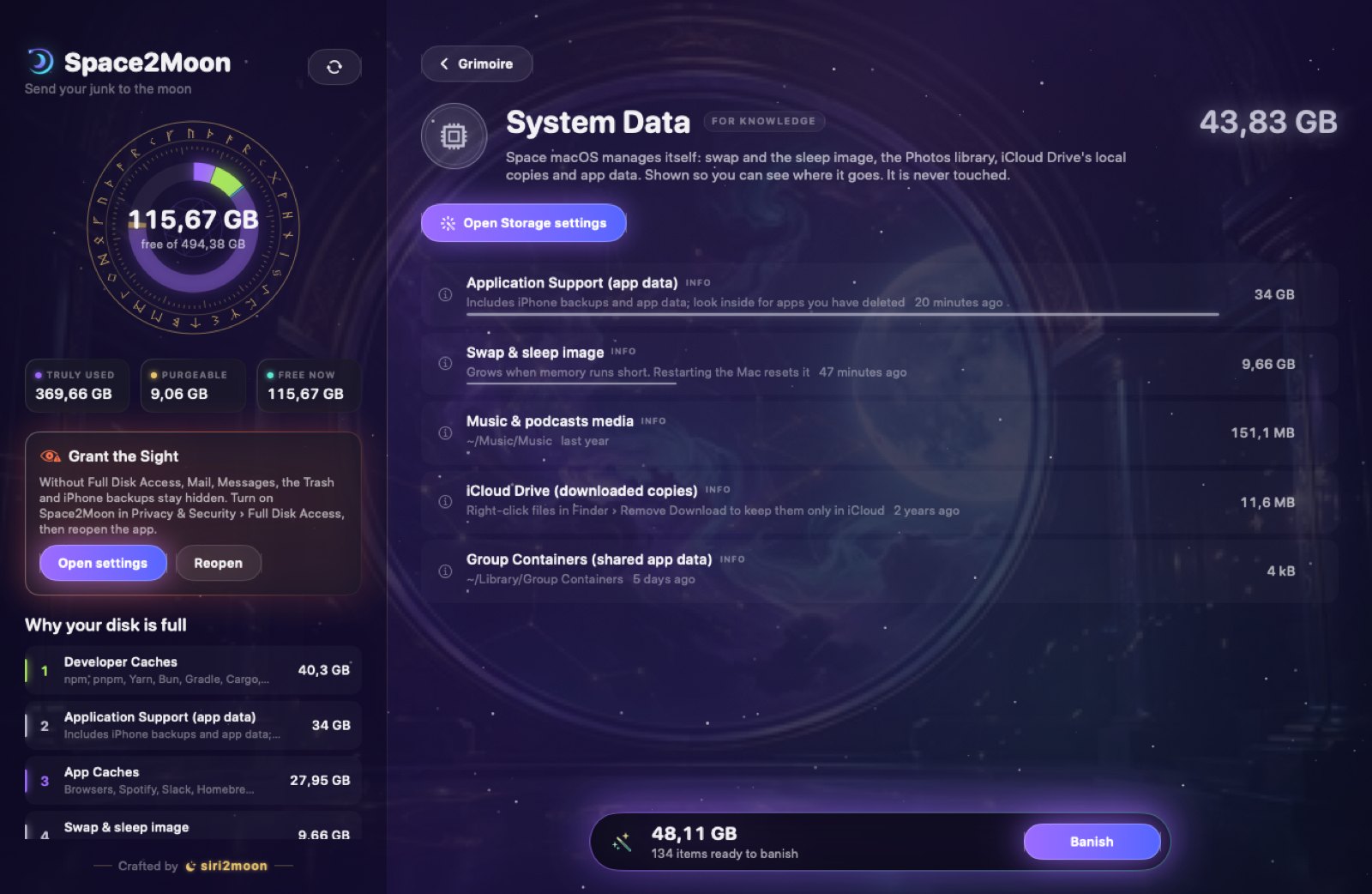
Open any category to see each item, its size, when it was last used and what it is.
Every category carries a verdict: Safe to banish, Review first, Guided ritual or For knowledge. You tick what you want gone and press Banish. Then:
- Rebuildable data (caches, logs, DerivedData) is deleted, because apps simply rebuild it.
- Your own files (Downloads, big files, backups) go to the Trash, so you can still restore them.
4. Rituals for what can't be deleted file by file
Some space can't be freed by deleting files. For those, Space2Moon runs the right command for you: thin Time Machine snapshots (it asks for your password), docker system prune -a, remove unavailable simulators, and open the right page of Mail or Storage settings.
Built not to break your Mac
A disk cleaner you can't trust is worse than none. So the rules are strict, and they are in the code, not in the marketing:
- A safety guard checks every path before anything is removed. It refuses anything outside your home folder, refuses to delete a category folder itself, and never touches files inside Mail's store or a Photos library.
- Nothing leaves your Mac. There is no network code at all: no account, no analytics, no telemetry. The scan history stays in
~/Library/Application Support/Space2Moon/history.json. - It's open source. All the code is on GitHub under the MIT licence. Read the safety guard yourself; it has its own tests.
Install it in a minute
- Download the latest
Space2Moon-<version>.dmgfrom GitHub Releases, open it and drag Space2Moon to Applications. - The app isn't notarized by Apple yet, so the first launch needs one extra step: in Finder, right-click Space2Moon › Open › Open. (Or run
xattr -dr com.apple.quarantine /Applications/Space2Moon.appin Terminal.) - When the app asks, grant Full Disk Access in System Settings › Privacy & Security › Full Disk Access, then press Reopen. Without it, Mail, Messages, the Trash and iPhone backups stay hidden. The banner disappears by itself once access is granted.
It needs macOS 15 or later and runs on both Apple silicon and Intel Macs.

How it's built (for the developers)
- SwiftUI and Swift 6.2, no dependencies. Two targets:
MageCore(scanner, cleaner, safety guard, history) has no UI and runs off the main actor, and the app target uses main-actor-by-default isolation. Each category scan is a@concurrentfunction, and the app runs all 13 in a task group, so the window stays smooth while gigabytes are measured. - Measuring real disk usage. Sizes come from
totalFileAllocatedSizeKey, which counts what the files actually occupy on disk (APFS clones and sparse files included), not their logical size. Big files come from Spotlight (mdfind), snapshots fromtmutil. - Purgeable space. macOS reports two "available" numbers:
volumeAvailableCapacityandvolumeAvailableCapacityForImportantUsage. The difference is the purgeable space the gauge shows. - Full Disk Access detection probes the protected folders and rechecks every time the app comes back to the front, so the banner goes away right after you flip the switch.
- The magic is Canvas and TimelineView. The rune circle, the sparks and the floating wizard are drawn every frame in SwiftUI, and the looping animations pause when Reduce Motion is on.
- The art. The icon, the background and the wizard (Siri, the siri2moon robot, in a wizard hat) were painted with Meta Muse through my own MoonReel. The wizard was then lifted out of its background with Apple's Vision framework (the same model as "Copy Subject" in Photos).
FAQ
Is Space2Moon free?
Yes. It's free and open source under the MIT licence. There's nothing to buy and no account.
Is it safe?
Rebuildable data is deleted and your own files go to the Trash, so you can restore them. A safety guard blocks anything outside your home folder, Mail's store and Photos libraries. You always see and choose each item before anything is removed.
Why does it need Full Disk Access?
macOS hides Mail, Messages, Safari data, the Trash and iPhone backups from every app unless you grant Full Disk Access. Space2Moon still works without it, but those categories stay locked.
Why does macOS say "Apple could not verify" the app?
Because it isn't notarized yet. Right-click the app and choose Open once, and macOS remembers your choice. You can also build it yourself from the source with swift build.
Does it send anything over the internet?
No. There is no network code in the app.
What is "purgeable" space?
Space macOS has promised to free on its own when it needs to, such as iCloud files it can download again and old caches. It counts as used in Finder but available to macOS, which is why the two numbers rarely match.
Send your junk to the moon
👉 Download Space2Moon for macOS · Source code on GitHub
If it gives you back a few gigabytes, a ⭐ on GitHub helps other people find it. And if you find a place where space hides that Space2Moon doesn't know about yet, open an issue and I'll teach the wizard a new spell.

Work with me
Building something like this?
I'm Binh — an AI & cloud engineer with 11+ years shipping production software. I take on consulting and build work. Tell me what you're working on and where it's stuck.