
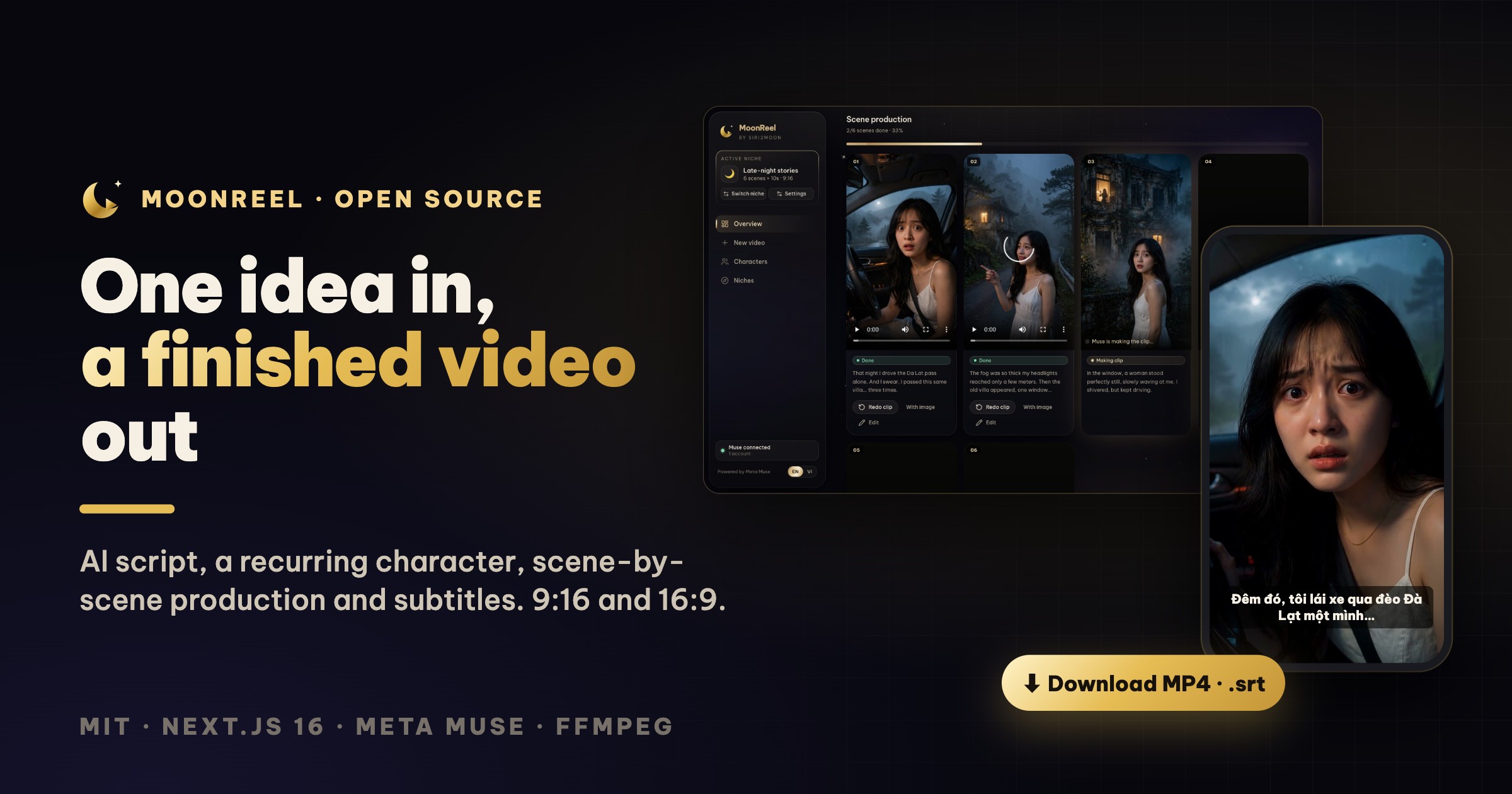

🌙 MoonReel: an open-source AI video studio · ⭐ GitHub · MIT
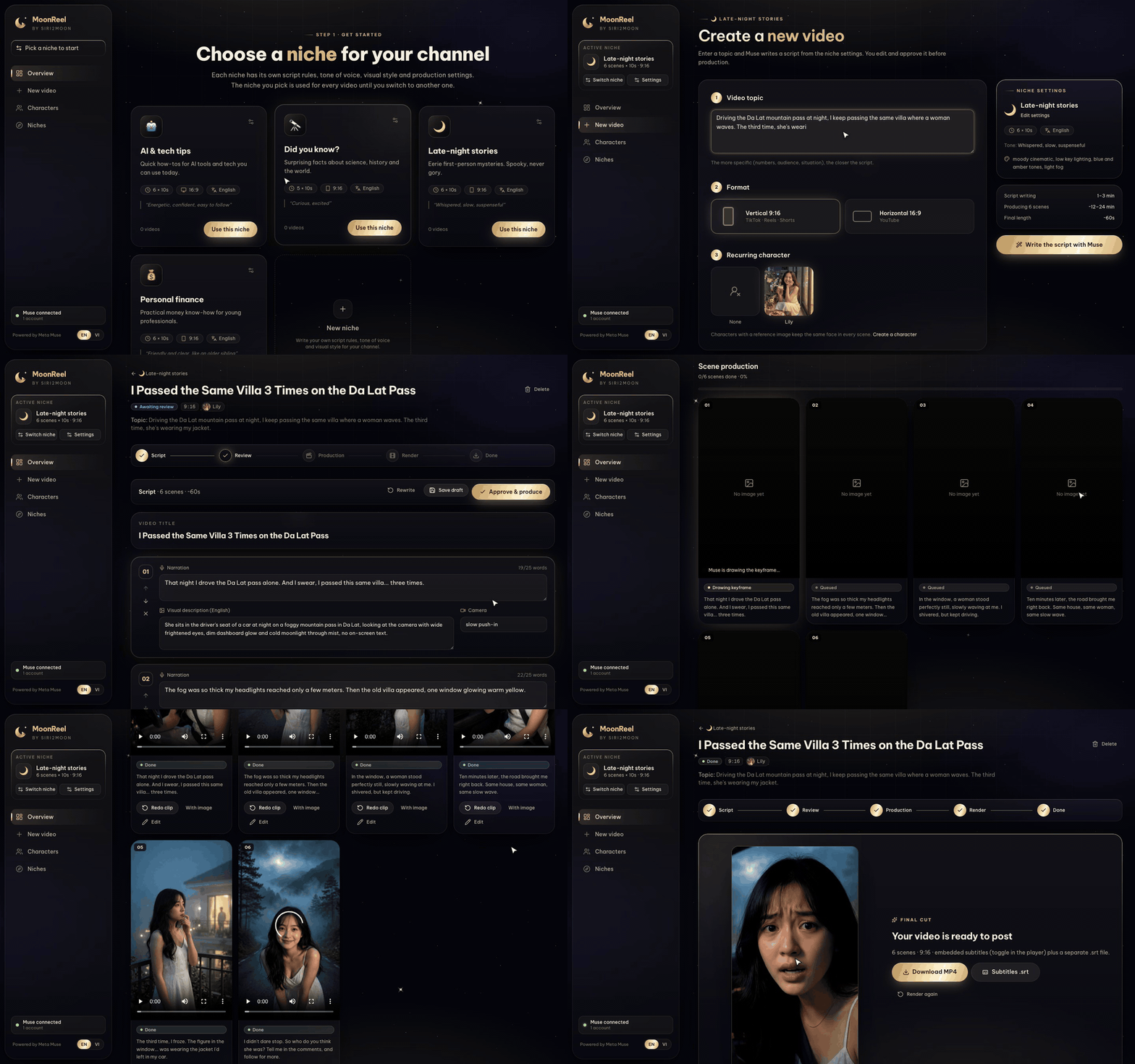
The whole flow in about 30 seconds. Scene production is sped up; in real life each scene takes a few minutes.
If you have searched for a Meta Muse video API, a muse.ai API or any way to generate Muse AI videos programmatically, you have probably found the same thing I did: there isn't one. Muse makes good ten-second clips with sound, but only inside the muse.ai app, one prompt at a time.
This post introduces the workaround I built and open-sourced. But first, why I needed it.
Short-video channels eat ideas. You can have a notebook full of them and still spend a whole evening turning one of them into sixty seconds of video: write a script, find or generate visuals that look like they belong together, keep the main character's face the same from shot to shot, animate it, cut it, add subtitles, export it twice because one platform wants 9:16 and the other wants 16:9.
I wanted the evening back. So I built a studio where the input is one sentence and the output is a video you can post.
That studio is MoonReel: a free, open-source AI video generator that drives Meta Muse for you, and it is MIT-licensed:
👉 github.com/siri2moon/moonreel
Is there a Meta Muse video API?
Short answer: not yet (as of October 2026).
- Meta's official developer API (the Meta Model API) offers Muse chat and image models, but no video model.
- Video generation exists only inside the Muse agent at muse.ai, which produces roughly ten-second 720p clips with audio.
- The only programmatic routes today are unofficial bridges that drive the muse.ai web app with your own logged-in session, either as a paid hosted proxy or self-hosted.
MoonReel uses the self-hosted route. It runs muse2api, an MIT-licensed bridge, in Docker next to the app. muse2api exposes Muse chat, image and image-to-video as an HTTP API, and MoonReel builds a complete production pipeline on top of it: script, consistent character, keyframes, clips, subtitles and the final MP4.
What that means in practice:
- No extra API fees. Generation uses your own muse.ai allowance.
- It is unofficial. It can break when muse.ai changes, and automating a consumer account may conflict with Muse's terms. Use a secondary account.
- Sessions expire. The
hatch_vmlcookie lasts about two days, so you re-import cookies from time to time. The README shows three ways to do it. - You are not locked in. Providers sit behind a small interface, so when Meta ships an official Muse video API, MoonReel switches with one new file.
What it does
You open MoonReel and pick a niche: the kind of channel you run. Then you type an idea like this one:
"Driving the Da Lat mountain pass at night, I keep passing the same villa where a woman waves. The third time, she's wearing my jacket."
From there:
- Muse writes the script. Scene by scene, in the niche's tone and language: narration, a visual description and a camera move for each shot.
- You stay in charge. Edit any line, reorder scenes, add or remove them, then press Approve & produce.
- Every scene gets a keyframe. Muse draws it from your recurring character's reference image, so the same face shows up in every shot.
- Every keyframe becomes a clip. Muse animates it into a roughly ten-second video, using the keyframe as the first frame.
- FFmpeg assembles the result. Clips are normalized, joined and given embedded subtitles, plus a separate
.srtfile.
Here is the whole journey, from that one sentence to the finished sixty-second video, which plays in full at the end:
The final minute is untouched MoonReel output: script, keyframes, animation and subtitles. The narration is in Vietnamese because the "late-night stories" niche is set to Vietnamese.
Niches: the rulebook for a channel
The niche is the idea I'm proudest of. A niche is not a template; it is the rulebook for a whole channel:
- Script instructions, for example "setting → something odd → climax → open ending; no gore; the last scene asks viewers to guess the ending".
- Tone of voice and narration language.
- Visual style, such as "moody cinematic, low key lighting, blue and amber tones, light fog".
- Production settings: scene count, seconds per scene, default format and default character.
You pick a niche once and the whole workspace is scoped to it until you switch. Every video in that niche sounds and looks like it came from the same channel, because it did.
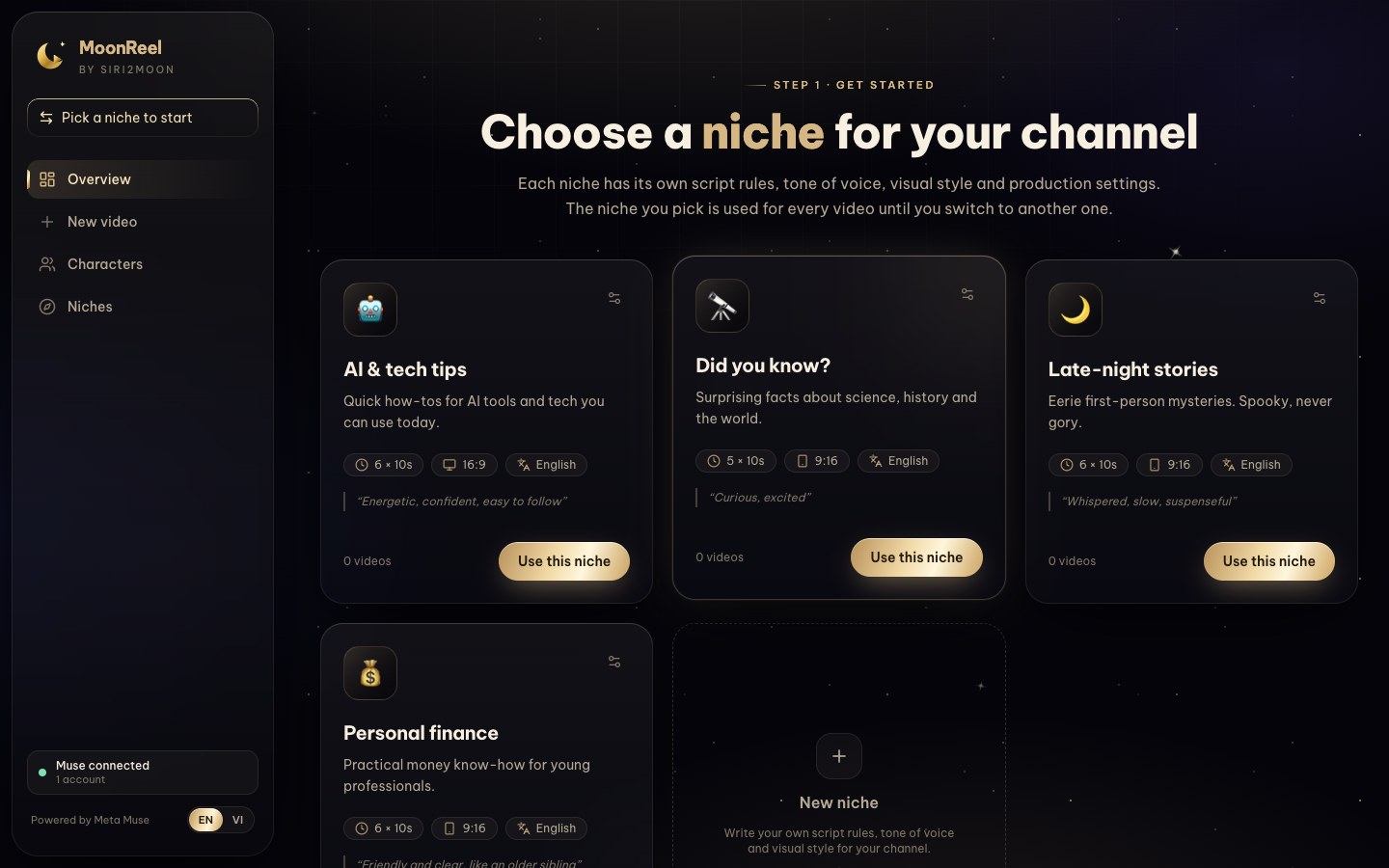
MoonReel ships with four sample niches (late-night stories, personal finance, "did you know?" facts and AI & tech tips), and you can write your own.
One character, every scene
Faces drifting from shot to shot is what gives most AI video away. MoonReel treats the recurring character as a first-class object: describe the appearance once, then let Muse draw a full-body reference or upload your own image. Every keyframe is generated from that reference, and the niche can preselect the character, so new videos start with the right face.
Production you can watch, and fix
Each scene moves through Queued → Drawing keyframe → Making clip → Done, and the project page updates live.
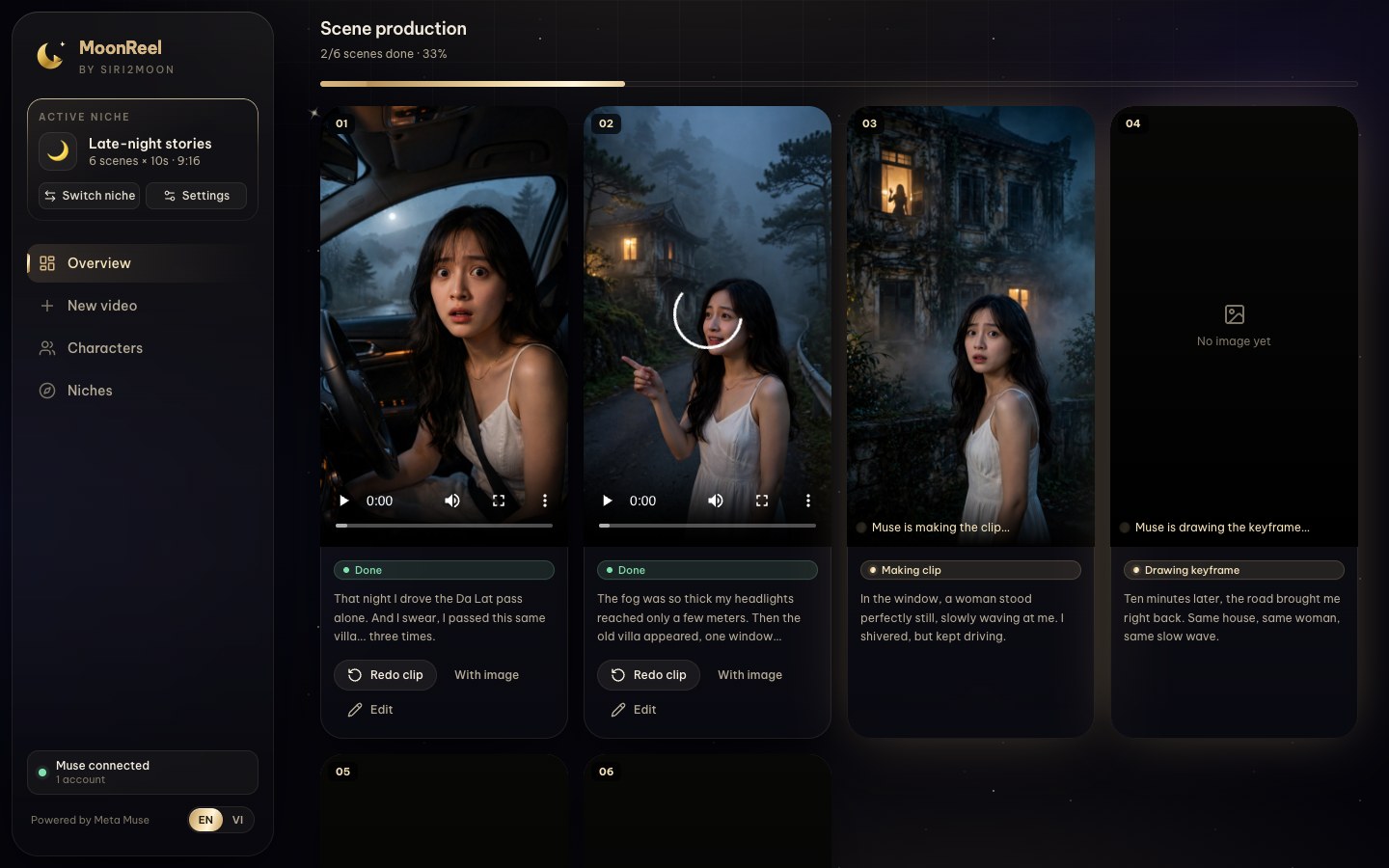
AI misses sometimes, so every scene card has an escape hatch:
- Redo clip keeps the keyframe and animates it again.
- With image redraws the keyframe as well.
- Edit rewrites that scene's narration, visual description or camera first. The subtitle follows the new narration automatically.
When Muse declines a scene, for example because a tense close-up looks too much like a threat, MoonReel doesn't just show "failed". It tells you Muse refused, shows Muse's own reply and suggests softening the description. One edit later, the scene goes through.
When the last scene finishes, the video is rendered automatically and you get Download MP4 and Subtitles .srt.
Under the hood
MoonReel runs entirely on your machine:
| Layer | Technology |
|---|---|
| Web app | Next.js 16 (App Router, Server Actions, Cache Components), React 19, Tailwind CSS 4 |
| Data | PostgreSQL 17, Drizzle ORM |
| Jobs | pg-boss 12, with queues in the same Postgres |
| AI | Meta Muse through muse2api |
| Rendering | FFmpeg and ffprobe |
The web app never calls Muse inside a request. Anything slow, such as writing a script, drawing a reference image, producing a scene or rendering a video, becomes a pg-boss job that a separate worker picks up. That keeps the UI instant and lets a failed scene be retried on its own without touching the rest.
Providers sit behind a small GenerationProvider interface with three methods: chat, generateImage and generateVideo. Muse is the first implementation. Kling or Seedance can be added without touching the pipeline.
The interface is available in English and Vietnamese. It follows your browser's language and can be switched from the sidebar.
Try it
You need Node.js 20.9+, pnpm, Docker, FFmpeg and a muse.ai account:
git clone https://github.com/siri2moon/moonreel.git
cd moonreel/moonreel-studio
pnpm install
cp .env.example .env            # set MUSE2API_KEY (openssl rand -hex 32)
docker compose up -d            # Postgres + muse2api
pnpm db:push && pnpm db:seed    # tables + 4 sample niches
# connect a muse.ai account at http://localhost:18610/admin?key=<MUSE2API_KEY>
pnpm dev                        # terminal 1 → http://localhost:3000
pnpm worker                     # terminal 2
The README covers every step, including three ways to connect your Muse account and fixes for the usual hiccups.
What's next
- More providers (Kling, Seedance) behind the same interface.
- Burned-in captions, background music and transitions.
- An MCP-connector mode so Muse can pull jobs straight from MoonReel.
- Publishing directly to TikTok and YouTube.
MoonReel is young and built in the open. Translations, new sample niches, providers and bug reports are all welcome; CONTRIBUTING.md explains how to get started.
FAQ
Does Meta Muse have an API for video generation?
Not publicly. Meta's official API covers Muse chat and image models but not video. Video is only available inside the muse.ai app, which is why MoonReel automates it through muse2api.
How can I generate Meta Muse videos programmatically or in bulk?
Run MoonReel locally. It queues every scene as a background job, sends it to Muse through muse2api, retries failures and stitches the clips together. You can also call muse2api's HTTP API directly if you only need raw clips.
Is MoonReel free?
Yes. MoonReel and muse2api are both MIT-licensed. You need your own muse.ai account, and generation counts against that account's allowance.
Is automating muse.ai allowed?
It is a gray area. muse2api drives the web app with your session cookies, which may conflict with Muse's terms of service. Use a secondary account and moderate volumes.
Which formats does it produce?
Vertical 9:16 for TikTok, Instagram Reels and YouTube Shorts, and horizontal 16:9 for YouTube, as an MP4 with embedded subtitles plus an .srt file.
Can I use another AI video model instead of Muse?
The pipeline talks to a GenerationProvider interface, so Kling, Seedance or an official Muse API can be added as new providers. Muse is the first one.
Tóm tắt (Tiếng Việt)
Meta Muse chưa có API tạo video? Đúng vậy: API chính thức của Meta mới có chat và tạo ảnh, còn tạo video chỉ làm được trong app muse.ai. MoonReel là phần mềm mã nguồn mở miễn phí giúp bạn tự động tạo video bằng Meta Muse: nhập một câu ý tưởng, AI viết kịch bản theo ngách, giữ nguyên khuôn mặt nhân vật qua từng cảnh, dựng clip và xuất MP4 có phụ đề cho TikTok, Reels, Shorts và YouTube. Giao diện có tiếng Việt. Mã nguồn: github.com/siri2moon/moonreel.
MoonReel is open source under the MIT license. Clone it, make your first video tonight, and ⭐ star it if you'd like to follow along: github.com/siri2moon/moonreel.