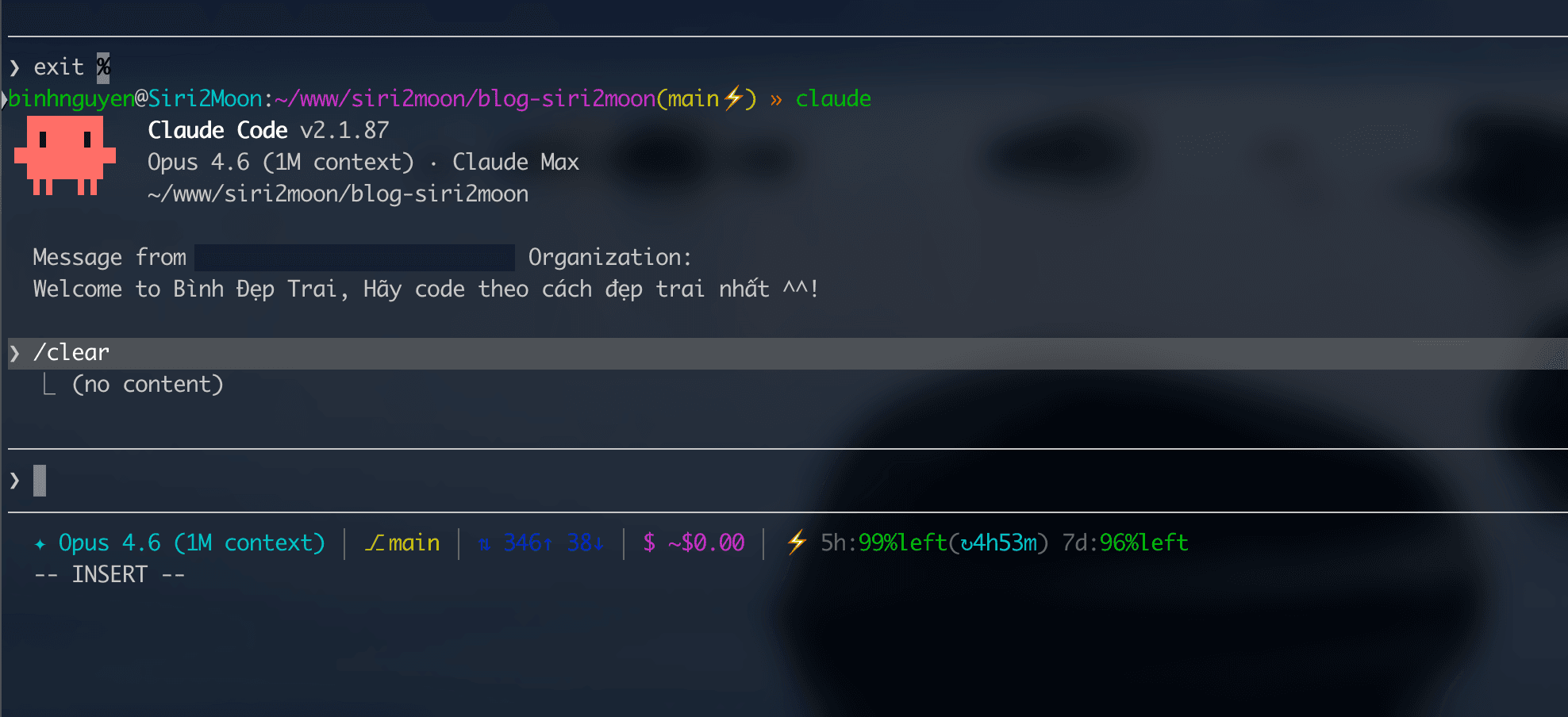

A guide to setting up a custom statusline for Claude Code CLI, displaying real-time information: model, git branch, context usage, token consumption, estimated cost, and quota remaining.
Preview
✦ Opus 4.6 (1M context) │ ⎇ dev_eks │ ◈ 12% │ ⇅ 45.2K↑ 3.1K↓ │ $ $1.26 │ ⚡ 5h:95%left(↻3m) 7d:96%left
Section Breakdown
| Icon | Meaning | Example | Description |
|---|---|---|---|
| ✦ | Model | Opus 4.6 (1M context) | Currently active model |
| ⎇ | Git branch | dev_eks | Current branch of the repository |
| ◈ | Context window | 12% | % of context window used (max 100%) |
| ⇅ | Token usage | 45.2K↑ 3.1K↓ | Input tokens (↑ sent) and output tokens (↓ received) in the session |
| $ | Cost | $1.26 | Estimated cost of the current session |
| ⚡ | Quota | 5h:95%left(↻3m) 7d:96%left | Remaining quota (only shown for Pro/Max plans) |
Token Usage Details
- ↑ (Input tokens): Total tokens sent to Claude (prompts, code context, file contents, system instructions...)
- ↓ (Output tokens): Total tokens returned by Claude (responses, generated code, explanations...)
- Output tokens cost 5x more than input tokens (Opus: $15/1M input vs $75/1M output)
Quota & Rate Limit Details
- 5h: % of quota remaining in the rolling 5-hour window
- 7d: % of quota remaining in the 7-day window
- ↻3m: Countdown timer until the 5-hour window resets
- Color-coded warnings:
- Green: > 30% remaining
- Yellow: 10-30% remaining
- Red: < 10% remaining (slow down usage)
Note: The quota section only appears if you are on a Claude Pro/Max subscription. It will not appear when using an API key.
Prerequisites
- Claude Code CLI installed (installation guide)
- jq - Command-line JSON processor
Check if jq is installed:
which jq
If not installed:
# macOS
brew install jq

# Ubuntu/Debian
sudo apt-get install jq

# Windows (scoop)
scoop install jq
Installation (3 Steps)
Step 1: Create the statusline script
Create the file ~/.claude/statusline-command.sh:
cat > ~/.claude/statusline-command.sh << 'SCRIPT'
#!/bin/bash
input=$(cat)

model=$(echo "$input" | jq -r '.model.display_name')
model_id=$(echo "$input" | jq -r '.model.id')
used=$(echo "$input" | jq -r '.context_window.used_percentage // empty')
total_input=$(echo "$input" | jq -r '.context_window.total_input_tokens // 0')
total_output=$(echo "$input" | jq -r '.context_window.total_output_tokens // 0')

# Git branch
cwd=$(echo "$input" | jq -r '.cwd')
branch=""
if git -C "$cwd" rev-parse --git-dir > /dev/null 2>&1; then
  b=$(git -C "$cwd" symbolic-ref --short HEAD 2>/dev/null || git -C "$cwd" rev-parse --short HEAD 2>/dev/null)
  [ -n "$b" ] && branch="$b"
fi

# Cost calculation
cost=""
if [ "$total_input" -gt 0 ] 2>/dev/null || [ "$total_output" -gt 0 ] 2>/dev/null; then
  cost=$(echo "$model_id $total_input $total_output" | awk '{
    model=$1; inp=$2; out=$3
    if (model ~ /opus-4/) { in_price=15; out_price=75 }
    else if (model ~ /sonnet-4|sonnet-3-7|sonnet-3\.7/) { in_price=3; out_price=15 }
    else if (model ~ /haiku-3-5|haiku-3\.5/) { in_price=0.80; out_price=4 }
    else if (model ~ /haiku/) { in_price=0.25; out_price=1.25 }
    else { in_price=3; out_price=15 }
    total = (inp / 1000000 * in_price) + (out / 1000000 * out_price)
    if (total < 0.01) printf "~$0.00"
    else printf "$%.2f", total
  }')
fi

# Context percentage
ctx=""
[ -n "$used" ] && ctx="$(printf '%.0f' "$used")"

# Token display (format: 12.3K / 1.5K)
tokens=""
if [ "$total_input" -gt 0 ] 2>/dev/null || [ "$total_output" -gt 0 ] 2>/dev/null; then
  fmt_in=$(echo "$total_input" | awk '{
    if ($1 >= 1000000) printf "%.1fM", $1/1000000
    else if ($1 >= 1000) printf "%.1fK", $1/1000
    else printf "%d", $1
  }')
  fmt_out=$(echo "$total_output" | awk '{
    if ($1 >= 1000000) printf "%.1fM", $1/1000000
    else if ($1 >= 1000) printf "%.1fK", $1/1000
    else printf "%d", $1
  }')
  tokens="${fmt_in}↑ ${fmt_out}↓"
fi

# Rate limits (Pro/Max only)
rate_5h=$(echo "$input" | jq -r '.rate_limits.five_hour.used_percentage // empty')
rate_7d=$(echo "$input" | jq -r '.rate_limits.seven_day.used_percentage // empty')
reset_5h=$(echo "$input" | jq -r '.rate_limits.five_hour.resets_at // empty')

# Build colorful output
R=$'\e[0m'
CYAN=$'\e[36m'
YELLOW=$'\e[33m'
GREEN=$'\e[32m'
MAGENTA=$'\e[35m'
DIM=$'\e[90m'
BLUE=$'\e[34m'
RED=$'\e[31m'
WHITE=$'\e[97m'

out="${CYAN}✦ ${model}${R}"
[ -n "$branch" ] && out="${out} ${DIM}│${R} ${YELLOW}⎇ ${branch}${R}"
[ -n "$ctx" ] && out="${out} ${DIM}│${R} ${GREEN}◈ ${ctx}%${R}"
[ -n "$tokens" ] && out="${out} ${DIM}│${R} ${BLUE}⇅ ${tokens}${R}"
[ -n "$cost" ] && out="${out} ${DIM}│${R} ${MAGENTA}$ ${cost}${R}"

if [ -n "$rate_5h" ]; then
  pct_5h_val=$(printf '%.0f' "$rate_5h")
  rem_5h=$((100 - pct_5h_val))

  # Color for 5h based on remaining
  if [ "$rem_5h" -le 10 ]; then
    C5H=$RED
  elif [ "$rem_5h" -le 30 ]; then
    C5H=$YELLOW
  else
    C5H=$GREEN
  fi

  out="${out} ${DIM}│${R} ${MAGENTA}⚡${R}"
  out="${out} ${DIM}5h:${R}${C5H}${rem_5h}%left${R}"

  # Countdown timer
  if [ -n "$reset_5h" ]; then
    now=$(date +%s)
    diff=$(( ${reset_5h%.*} - now ))
    if [ "$diff" -gt 0 ]; then
      hours=$((diff / 3600))
      mins=$(( (diff % 3600) / 60 ))
      if [ "$hours" -gt 0 ]; then
        tl="${hours}h${mins}m"
      else
        tl="${mins}m"
      fi
      out="${out}${DIM}(${R}${CYAN}↻${tl}${R}${DIM})${R}"
    fi
  fi

  # 7d quota
  if [ -n "$rate_7d" ]; then
    pct_7d_val=$(printf '%.0f' "$rate_7d")
    rem_7d=$((100 - pct_7d_val))

    if [ "$rem_7d" -le 10 ]; then
      C7D=$RED
    elif [ "$rem_7d" -le 30 ]; then
      C7D=$YELLOW
    else
      C7D=$GREEN
    fi

    out="${out} ${DIM}7d:${R}${C7D}${rem_7d}%left${R}"
  fi
fi

echo -n "$out"
SCRIPT
Step 2: Make the script executable
chmod +x ~/.claude/statusline-command.sh
Step 3: Configure settings.json
Open ~/.claude/settings.json and add (or update) the statusLine field:
# If settings.json does not exist yet
mkdir -p ~/.claude
cat > ~/.claude/settings.json << 'EOF'
{
  "statusLine": {
    "type": "command",
    "command": "bash ~/.claude/statusline-command.sh"
  }
}
EOF
If you already have a settings.json file, just add the statusLine section to the existing JSON object:
{
  "statusLine": {
    "type": "command",
    "command": "bash ~/.claude/statusline-command.sh"
  }
}
Step 4: Restart Claude Code
Exit and reopen Claude Code:
# Exit the current session
# Press Ctrl+C or type /exit

# Reopen
claude
The new statusline will appear at the bottom of the terminal.
Token Pricing Reference
Prices used to calculate the estimated cost displayed on the statusline:
| Model | Input (per 1M tokens) | Output (per 1M tokens) |
|---|---|---|
| Opus 4.6 | $15.00 | $75.00 |
| Sonnet 4.6 / 3.7 | $3.00 | $15.00 |
| Haiku 4.5 | $0.80 | $4.00 |
| Haiku 3 | $0.25 | $1.25 |
The cost shown on the statusline is an estimate based on raw token counts and does not account for cached tokens (which are cheaper). Actual costs may be lower.
Customization
Hiding Sections
If the statusline is too long, comment out any sections you don't need in the script. For example, to hide the token counter:
# [ -n "$tokens" ] && out="${out} ${DIM}│${R} ${BLUE}⇅ ${tokens}${R}"
Changing Colors
ANSI color codes can be modified:
| Variable | Color | Code |
|---|---|---|
CYAN | Light blue | \e[36m |
YELLOW | Yellow | \e[33m |
GREEN | Green | \e[32m |
MAGENTA | Purple | \e[35m |
BLUE | Blue | \e[34m |
RED | Red | \e[31m |
WHITE | White | \e[97m |
DIM | Gray | \e[90m |
Adjusting Quota Warning Thresholds
Default thresholds: green (>30%), yellow (10-30%), red (<10%). To change them in the script:
# Example: trigger warnings earlier
if [ "$rem_5h" -le 20 ]; then    # red when < 20% remaining
  C5H=$RED
elif [ "$rem_5h" -le 50 ]; then  # yellow when < 50% remaining
  C5H=$YELLOW
else
  C5H=$GREEN
fi
Available Data Fields
The statusline script receives JSON input from Claude Code with the following fields. You can extend the script to display additional information:
| Field | Type | Description |
|---|---|---|
model.id | string | Model ID (e.g., claude-opus-4-6) |
model.display_name | string | Model display name |
context_window.total_input_tokens | number | Total input tokens in the session |
context_window.total_output_tokens | number | Total output tokens in the session |
context_window.used_percentage | number | % of context window used |
context_window.remaining_percentage | number | % of context window remaining |
context_window.context_window_size | number | Total context window size |
cost.total_cost_usd | number | Total session cost (USD) |
cost.total_duration_ms | number | Total session duration (ms) |
rate_limits.five_hour.used_percentage | number | % of 5h quota used (Pro/Max only) |
rate_limits.five_hour.resets_at | number | Unix timestamp for 5h window reset |
rate_limits.seven_day.used_percentage | number | % of 7d quota used (Pro/Max only) |
rate_limits.seven_day.resets_at | number | Unix timestamp for 7d window reset |
session_id | string | Current session ID |
vim.mode | string | Current Vim mode |
Troubleshooting
Statusline not showing
-
Verify the file exists and is executable:
ls -la ~/.claude/statusline-command.sh -
Verify jq is working:
echo '{"test": "ok"}' | jq -r '.test' # Expected output: ok -
Test the script directly:
echo '{"model":{"display_name":"Test","id":"test"},"context_window":{"used_percentage":10,"total_input_tokens":1000,"total_output_tokens":500},"cwd":"."}' | bash ~/.claude/statusline-command.sh
Quota not showing
The quota section only appears when:
- You are on a Claude Pro or Max subscription
- At least one API response has been received in the session
If you are using an API key, this section will never appear - this is expected behavior.
Cost showing $0.00
This is normal at the beginning of a session when few tokens have been exchanged. The cost will increase as the conversation continues.
Other Useful Commands
In addition to the statusline, Claude Code provides built-in commands for monitoring usage:
| Command | Description |
|---|---|
/cost | View detailed token usage and cost for the current session |
/context | See what is consuming context window space |
/compact | Compress conversation history when context is nearly full |
/clear | Reset context and start a fresh conversation |